Worked Example
Goal
The December 2022 minutes for the CS Curriculum Committee say that CS346, a recently created course, should be added to “the Applications list of the Software Engineering Specialization”. The current list contains CS343, CS348, and CS349.
Check the Calendar
The 2025/26 Calendar shows this change:
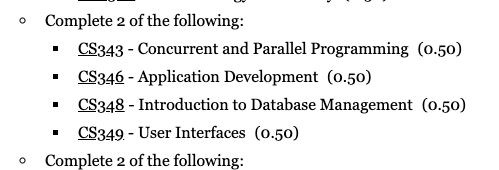
Figure out which calendar actually made the change by looking at the archives. In this case, the change appears in 2025/26 and 2024/25 but not in 2023/24. And there’s more change than we found in the UAPC minutes.
Once you gain experience, it’s probably worth poking around at this point. Has the change already been made?
Get set up
- Do you have an existing branch that’s appropriate for this work?
- How much work to put into a branch is a matter of judgement. You probably don’t want a new branch for every small change. On the other hand, you don’t want to put days and days of work across many different plans into the same branch. Make a branch for each group of related changes (eg one branch for CS changes, one for business program changes, …).
- Yes: Check it out in
SourceTree(i.e. double click on that branch name) - No:
- Check out the
mainbranch inSourceTree. Make sure you’re up to date; if not,pull. - Make a new branch for your work.
- Check out the
Find a student
There are several options for finding a student:
- If you’re responding to a user reporting an error, insist that they send you the ID of a student illustrating the error.
- Run the
da-sample-studentsprogram or review it’s output from a previous run. - If you’re starting with curriculum documentation, check out the
oat/oat-plandefs/sampleStudentsdirectory and explore the CSV files it contains. This is produced by querying all the plan codes and getting up to four random students for each one. Priority is given to those who have graduated or are nearly ready to graduate. It only looks at students with a requirement term of 1229 or later. Much of this is easily changed; if I didn’t get it correct, let me know. - Run query 1156 (brand new as of 2025-06-26!).
Extract one of the students using da-extract-transcript, for example:
da-extract-transcript 20769439 > transcripts/math/bac/cs/se/csbsehc-1249-grad.jsonThis assumes you have already used cd to change to oat/oat-plandefs/test. Use command completion to make
sure you get the path correct.
Dissecting the parts of this command, left to right:
da-extract-transcriptis the name of the program to run.20769439is the student id of the student for whom we want to extract a transcript.>says to redirect the program’s output into a file.transcripts/math/bac/cs/se/is the directory where the transcript file will be placed. It should correspond to the plan group for the plan code whose definition we’re modifying.csbsehcis the plan code whose definition we’re modifying.1249is the first term with the new modifications.gradis an identifier for this particular test. Common ones aregrad(a student that has graduated), andsyntest(a “synthetic test”, that is, one where we made modifications to a transcript)..jsonis the kind of data in the file.
Modify the transcript, as required
Edit the transcript with code transcripts/math/bac/cs/se/csbsehc-1249-grad.json.
- Change the requirement term for both the program and the plan to 1249.
- Find an existing course (perhaps CS349) and change it to CS346, the course we’re going to be adding.
Run the test
The first time you run a test on a new transcript, you’ll get a warning that the expected file does not exist and an empty file has been created:
oat3 test: da-run-tests transcripts/math/bac/cs/se/csbsehc-1249-grad.json
1 tasks
Progress:..   1
FAILED: /Users/oat3/oat/oat-plandefs/test/expected/math/bac/cs/se/csbsehc-1249-grad.txt does not exist; created empty file.
Passed: 0;  Failed: 1;  Error: 0
Elapsed Time:  1.1 seconds
oat3 test:
The output of the test will have been placed in actual/math/bac/cs/se/csbsehc-1249-grad.txt. Take
a look at that with more or look at the html version with open output/csbsehc-1249-grad.html. I usually
look at the html.
oat3 test: more actual/math/bac/cs/se/csbsehc-1249-grad.txt
20769439        r2habibi        CSBSEHC   PartiallySatisfied
-   audit 20769439 "Habibi, Rodin" {
-      plan CSBSEHC "Comp Sci/Softw Eng Opt, BCS HC" req=1189 cal=1189 using all passedCourses {
√         minAverage(MAV, CSBSEHC, 60)
√         9 of "CS core"  {
√            1 from ^CS_1[134]5: CS_135
√            1 from ^CS_1[34]6: CS_136
...
The top of the audit says that effectively the 2018/19 calendar was used. That makes sense, because we
haven’t made our changes yet.

Open/edit the files
The command degreeAudit edit XXXX-YYYY command will open the relevant files where XXXX
is the plan code and YYYY is the effective term.
Find the file(s) that need to change and do a “save-as” with the new effective term.
In the case of this example, 1249.
Make the required changes:
all of {
    1 of {
        ^BET_360
        ^BET_420
        ...
    }
    2 of { ^CS_343 ^CS_346 ... }
    2 of {
        ^CS_442
        ^CS_444
        ...
    }
    ^CS_445 + ^ECE_451
    ^CS_446 + ^ECE_452
    ^CS_447 + ^ECE_453
}
On the other hand…
Observe that CSBSEH-1179.plan and CSBSEHC-1179.plan are nearly identical
and both need the same change. This is a job for an include file!
- Create a new include file in the same directory,
seOpt-1179.plan. - Copy the
all of "CS courses" { ... }into it. Perhaps give “CS courses” a better name: “SE option”. - Replace that requirement in
CSBSEH-1179.planandCSBSEHC-1179.planwithinclude(seOpt, uw.u.math.bac.cs.se). - Create a new include file for the new requirements,
seOpt-1249.plan. Put the above requirements in it.
Test/review your work
Run da-run-tests transcripts/math/bac/cs/se.
- The existing tests should still pass. If they don’t, figure out why! It could be that we buggered up the plan definitions. It could also be that the new definitions are equivilent to the old ones but not identical, in which case the expected output of the test needs to change.
- The new plan will still fail because we haven’t said what the test should
expect. Take a really good look at the HTML output.
- Does it look like this student was evaluated correctly?
- Does the entire collected definition look correct and match the calendar?
- Is there anything you could do to improve the readability?
- Add labels? The UAPC minutes use the label “Foundations” for the CS_44[567] courses and “Applications” for some of the others.
- Are there places where a different way of specifying a course set would be more readable?
- Are there places where a named set of courses might be more appropriate?
- Oops… There is an additional constraint in the calendar: “Students may use no more than one of CS453 or CS459.” How can we code this?
When you’re happy with the test results, copy the “actual” file to the
same place in “expected”:
cp actual/math/bac/cs/se/csbsehc-1249-grad.txt expected/math/bac/cs/se/csbsehc-1249-grad.txt
(from the test directory).
Rerun the test. It should pass.
Commit your work
In SourceTree, commit your work to the branch you created. Consider pushing it
to git.uwaterloo.ca as a backup or to let someone else download it to test, review,
or comment on it.