Understanding the Audit
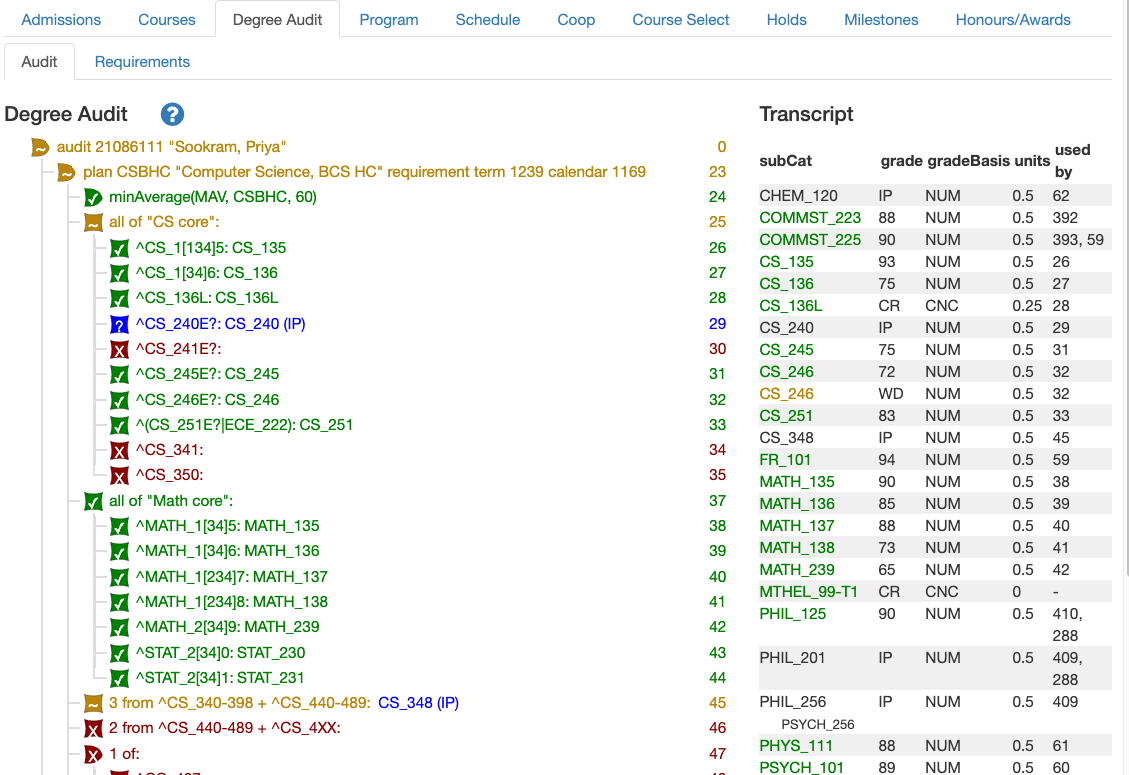
When you get to the Degree Audit, you will see two sections. The left side is the actual degree audit. The right side is a summary of the student’s transcript.
Meaning of Colours and Icons
There are 4 different colours and icons in the degree audit. They each have a different meaning.
| Colour | Icon | Meaning |
|---|---|---|
| Green | Checkmark 

|
The requirement has been satisifed. |
| Blue | Question Mark 
|
In progress courses, if passed, will satisfy this requirement. |
| Goldenrod | Tilde (~) 
|
The requirement has multiple parts (e.g. multiple courses). Some have been satisfied; some have not. |
| Red | X 
|
Unsatisfied; no progress has been made towards meeting this requirement. |
Meaning of Icon Shapes
There are two icon shapes – a shield  and a pointy square
  .
.
The shield is like the black triangle1 on the main ASIS page. It signals that there is more information available. Click it to show the additional information. When clicked, it will point down. Clicking again will hide the additional information and return the shield to its original position.
Transcript
The transcript summary contains five columns:
- subCat: Short for “subject code & catalog number” or the common identifier of the course taken.
They are listed in alphabetic order except that co-op-related courses are listed at the end. If a course is cross-listed and it’s the cross-listed course that’s relevant to the audit, both are shown. SeePHIL 256. If the course has a topic, that’s indicated with a topic number. SeeMTHEL_99-T1. - grade: The grade earned in the course or
IPfor in-progress courses. - gradeBasis: The grading basis for the course.
- units: The weight of the course. Most courses at UW are 0.5 units. A lab is often 0.25 units.
- used by: The requirements that used this course. Each requirement has a number to the far
right that are in generally increasing order (eg from 0 to 47 in the screenshot above). The
transcript says CS135 was used to satisfy requirement 26. Looking at the line labeled with “26”
in the audit, it is indeed CS135.
COMMST_225was used to satisfy requiremenst 393 and 59. The first (393) is the Math Communications requirement; the second is the CS depth and breadth requirement. It’s common for these two requirements to have overlapping courses. This column can be used to quickly identify courses that may violate the triple-counting rule.
-
Why not just use the black triangle? It can’t contain a symbol like a checkmark or X. ↩︎