W20 Design
High-Level Process
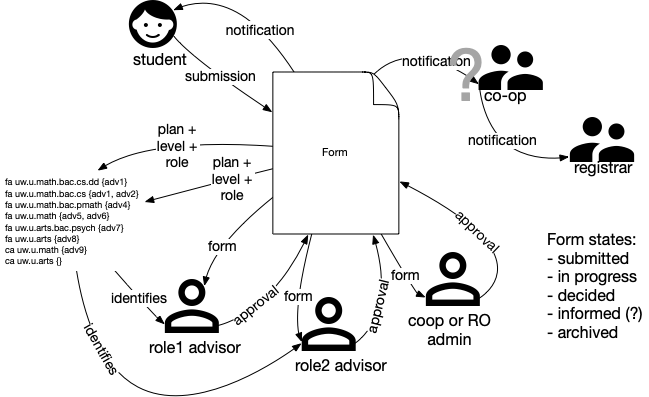
A form will have zero or more “advisors” who need to make a decision about the form. In the coop context, there might be a plan-level advisor, a faculty-advisor, perhaps an option-advisor, etc.
In addition, there might be an Records “advisor” or “coordinator” in Coop (or, for other processes, in the Registrar’s Office or an undergrad office). They give the final decision and then record the result in WaterlooWorks (or Quest).
Fundamental assumption: The system of record (WaterlooWorks, Quest) only gets the form once it is completely processed and that process results in a change that needs to be recorded in the system of record.
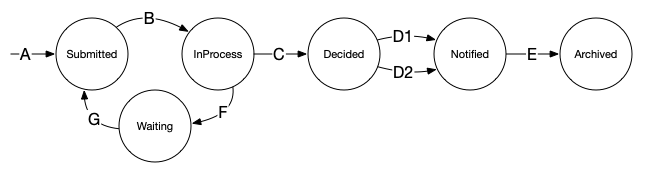
A form will be in one of the following states:
- Submitted: The student has submitted the form and may review it or change it.
- InProcess: At least one of the advisors has looked at the form. The student can no longer change it.
- Waiting: Waiting for the student to revise the form.
- Decided: All advisors have entered a decision and those decisions are all the same.
- Notified: All interested parties have been notified of the decision. (Assumption: all notifications happen at the same time, either upon decision or triggered later.)
- Archived: The form is archived for long-term storage; all processing (such as entry into WaterlooWorks or Quest) has been finished.
Decisions rendered by advisors will be one of the following:
- Positive_1, …, Positive_n (the form is approved)
- Refer back to student
- Negative_1, …, Negative_n
There may be a number of negative decisions that could reflect either the reason for the negative decision or gradations to be communicated to the student (e.g. try again next term vs. it’s never gonna happen). Similarly, there might be varieties of positive decisions that result in different communications to the student (e.g. approved for this term; approved for next term).
A decision of “Refer back to student”, by any advisor, immediately sends the student an email indicating they need to review the form and puts the form into the “Waiting” state. Any existing decisions by other advisors are cleared.
Once the advisors (which includes the Records coordinator) have all given their decision and all the decisions are the same, the form is marked as “decided” and the student will be notified via email.
There may be some post-processing to update WaterlooWorks or Quest with the result and then the form is archived.
Details
Form State Transitions
| Transition | Description |
|---|---|
| A: | Student submits the form. |
| B: | An advisor “touches” the form – looks at it, makes a decision, etc. The student can no longer change the form. |
| C: | All advisors have recorded a decision and those decisions are all the same. |
| D1: | All interested parties are notified (eg via email) automatically as soon as a consensus decision is reached. This would be appropriate when the decision for each student is independent of all the others. Not sure yet whether this should be an explicit action (button in the UI) or implicit when updating the form and consensus has been reached. It would also depend on the kind of notifications attached to the form. See “Notifications”, below. |
| D2: | All interested parties are notified (eg via email) in a batch (triggered manually). This would be appropriate when the decisions are related, for example admitting x of y students into a plan. |
| E: | Post-processing is completed (e.g. gathering stats on one round of program transfers). Assumption: Post-processing is outside the domain of the forms project except to say that moving from Notified to Archived is an explicit decision triggered by the form’s administrator. |
| F: | One of the advisors renders a “refer back to student” decision. Maybe more information is needed or it can’t be approved in its current form but a suggested revision could be approved. The student can edit the form. Forms in this state are not reported to advisors as needing a decision and may be purged after some number of days. |
| G: | Student edits the form. |
Identifying Advisors
A form will have a “decision widget” for each advisor that needs to be involved. Each of those widgets will have a role (plan advisor, option advisor, faculty advisor, coop admin, etc). To identify the specific people, look up in a table based on that role plus the student’s plan group plus the student’s level (1A, 2A, etc).
For example, give a table of:
| Role | Level | Plan Group | Advisors |
|---|---|---|---|
| PlanAdv | .* | uw.u.math.bac.cs | {bmlushma, mdpetric} |
| FacAdv | 1[AB] | uw.u.eng.bac | {EngUndergradOffice} |
| FacAdv | [2-4][AB] | uw.u.eng.bac | {} |
| PlanAdv | [2-4][AB] | uw.u.eng.bac.ece | {list of ece advisors} |
| PlanAdv | [2-4][AB] | uw.u.eng.bac.me | {list of mechanical advisors} |
| PlanAdv | 1[AB] | uw.u.eng.bac | {} |
A 1A or 1B engineering student form would go to the Eng Undergrad Office advisors for the FacAdv (faculty advisor) role. Said student would not go to a plan advisor (empty set).
A 2nd year and higher Eng student does not have a Faculty advisor. They would have a plan advisor.
The advisor role would be an exact match. I’m thinking of a regular expression for the level, although I think it’s likely to be students less than X and students greater than X. For the plan group, the most specific one takes precedence.
I think there might be a crucial decision to be made on the precedence between the plan group and the level. Plan group should probably be higher precedence. That is, filter by the role. Find the most specific plan group for the student and that role. Then look at the student’s level.
Every faculty should have a default – someplace it goes if nothing else matches. A null can be used to match any role. This is essentially an “oops, forgot that case in the table” scenario.
Maintaining this table could be a pain :(
Actions an advisor can take
An advisor should obviously be able to render a decision.
An advisor should be able to mark a form as “urgent” (see notifications).
There may be special circumstances – e.g. an advisor realizes that in this circumstance an Associate Dean needs to be consulted. Rather than build in a mechanism for adding the AD as an approver, that advisor is simply responsible for checking and perhaps adding in the notes.
An advisor needs to be able to refer back to the student, either for more information or because the request, as stated, can’t be approved. The student can then modify the form and resubmit it.
Notifications
Advisor Notification
Each morning an email is sent to anyone who could give a decision on a form indicating how many forms they have waiting, the age of the oldest one, and whether any of them are marked “urgent”. It may be useful to include information on the roles associated with the form and who (if anyone) has already approved for each role.
Interested Party Notification
Each form will have a list of notifications to send after a decision has been reached.
There might be several different styles of notification. For example:
- An email sent for each form
- A query run each day with the output sent to someone as a CSV attachment
At the current time we have need for email notification but probably not others.
Each notification will likely include:
- The decisions it applies to (eg admit, deny) It could be that students get different notifications for each decision whereas the RO gets the same email for every decision, just with different data.
- When the notification is done (eg immediately upon decision vs. when triggered by form administrator)
- The set of people it’s sent to {STUDENT, list of email addresses}
- The text of the email, with provision for data from the form to be inserted into it. One approach here would be Mustache (like bulk mail). Another would be something like the interpreter used in the summary page.
There will be a need for some in-office-use only fields that can be updated after a consensus is reached. For example, to indicate whether a course override has already been entered into Quest or not.
It’s not clear yet whether notifications should always be an explicit action (eg a button appears when a decision has been made) or implicit when a decision is reached and the user submits.
Tracking forms
Forms should be able to include a widget to give a student feedback on the progress a form is making. For example, how many “signatures” are required and how many have been given.
Index Pages
Advisors should have a page that lists the forms they need to look at. Or perhaps all the undecided forms on which they are listed with an indication of whether they have signed or not. That would be helpful if a student comes back and wants to know what’s happening with their form.
Our filtered tables may be a good solution to this.
Data to Admin units
When data is needed from the system for a bulk administrative function (e.g. choosing x of y applications for admission or updating Quest or WaterlooWorks) we will provide a page where that data can be viewed or downloaded as a CSV.